Docs
Intro
Announcing Statbocks, a new android application for displaying user and pool stats. This application works with the MPOS front end used by many mining pools. If your pool operator uses MPOS and has enabled API access, you can use your API key to retrieve your user stats and your pool stats. The screenshot below shows the stats view.
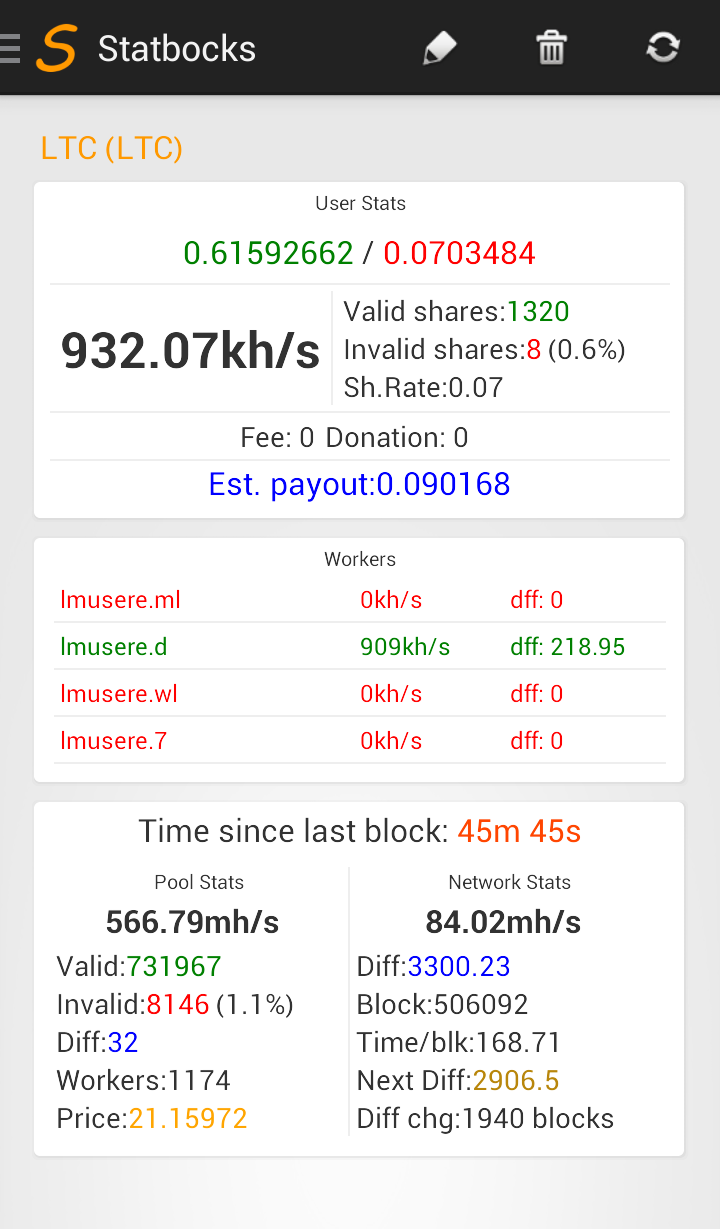
This view will show you all the relevant details in an easy to view manner. You can identify things off the screen without having to scan the screen thoroughly. Colored display helps you pick out what matters to you the most. Bigger fonts for important items helps you pick out what care for the most. The following screen shows you the main Statbocks view for a pool. Notice the hashrate is the what you really want to see and it is the easiest thing to read.
Below a simple list of steps on how to use Statbocks. To read more, see the docs link on the top of the page.
-
Add a new operator
- Select the operator from the Navigation Drawer by clicking on the right arrow next to the operator name.
- On the new page, add a new Pool
- Tap the pool, it will open in the edit window.
- Scan your QR code from your pool’s website. This code is shown under My Account -> QR codes on the main UI in the left menu for your pool site.
- Type in the pool name, and coin name. Hit save.
- In the Nav Drawer, tap the operator name, which will expand the list. From the list, tap the pool and it will open the view shown in the image.